Statistics & Analytics
League Dispatcher includes a full suite of statistics pages accessible from the Stats menu. Every stats page (Play Day, Games, Player Stats, Player Comparison, Winner Groups, Attendance Trends) shares the same date range selector with handy presets — last 7 days, last 30 days, last 3 or 6 months, all time, or a custom range — so you can pivot from one view to another without losing your time window. The global Events page also defaults to the last 6 months of history and properly resets when you switch players. Here is an overview of each page and what it offers.
All Players Stats
A full roster grid showing every player's games played, wins, win ratio, and total play time for the current session. Admins can also toggle player availability directly from this view.
Player Stats
Detailed individual performance dashboard with time-filtered bar charts for games played, wins, and play duration. Includes Elo rating history, personal bests, and streaks. Select any date range and export raw data as CSV.
Team Combinations
Reveals which player partnerships are most effective. Each row shows a unique team combination with their combined win/loss record and win rate. Click any team to see the full list of games they won and lost together.
Game History
A complete log of every match played, showing game time, duration, court, all participants, winners, scores, and score differential. Useful for auditing results or spotting scoring patterns.
Game Day Highlights
Animated achievement cards celebrating standout performances: MVP, Iron Player, longest win streak, closest game, dream team, and more. A fun way to wrap up the evening and recognize players.
Elo Leaderboard
A ranked list of all players sorted by their current Elo rating. Shows position, rating, and total Elo games played. Only available when Elo ratings are enabled in your league settings.
Attendance Trends
Track player presence and game participation over time. The chart shows two side-by-side bars per day — Present (players who checked in) and Played (players who participated in games). Filter by date range (presets or custom calendar picker) and by day of week (e.g., show only Mondays). The player table shows days present, presence rate, games played, win rate, and last active date.
Player Comparison
Head-to-head comparison of any two players: individual stats, rivalry record as teammates and opponents, common teammates/opponents network, and shared game history. Great for friendly rivalries.
Dashboard
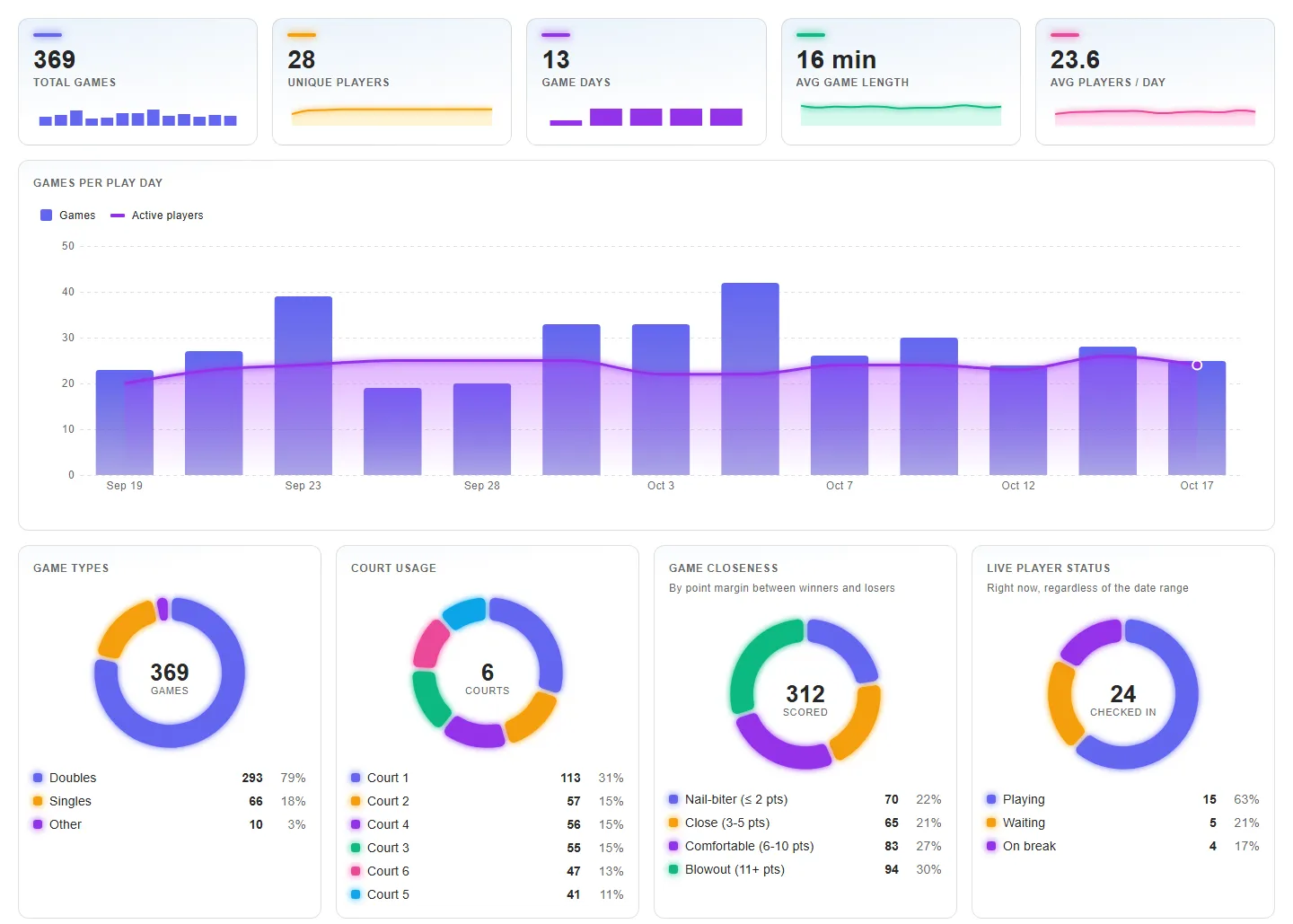
A visual overview of your league for the selected date range: summary cards with sparklines (total games, unique players, game days, average game length, average players per day), games per play day with active players, donut charts for game types, court usage, game closeness, and live player status, league health gauges, best duos, a win rate vs games played chart, profiles of the 3 most active players, and top-5 lists for busiest hours, most games played, and best win rate.
To open it, go to Stats > Dashboard, then pick a date range: current play day, last 7 or 30 days, last 3 or 6 months, or a custom range up to 6 months. The default is the last 30 days. Average game length ignores games longer than your league's maximum game length setting. Best duos need at least 5 games together, and the win rate chart only shows players with at least 5 games.