Follow a Player
Follow up to 2 players in a league and League Dispatcher lets you know when they head to a court, finish a game, or change status — even when your phone is locked. Great for parents, partners, and anyone waiting for their turn.
How to Follow a Player
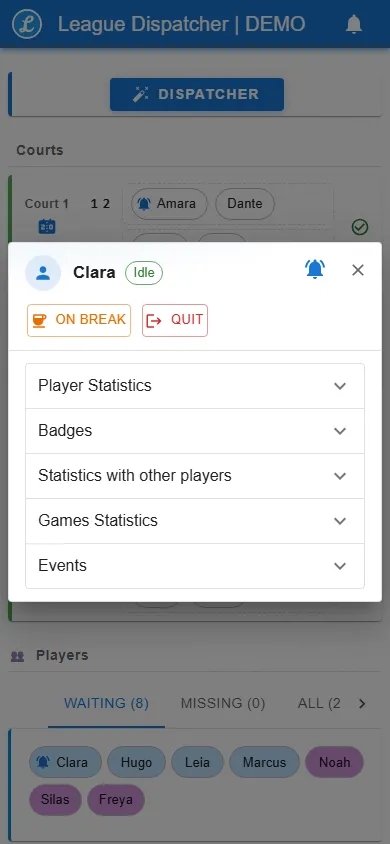
Tap a player's name or chip to open their player window, then tap the bell in the window header. Tap the bell again to unfollow. Followed players show a small bell on their chip so you can spot them at a glance. You can follow up to 2 players per league.
What You Get Alerted About
You get an alert when a followed player:
- Is dispatched to a court — including who they play with.
- Finishes a game — won or lost, with the score.
- Changes status — goes on break, is back in the queue, arrives, or leaves.
Alerts in the App
While the app is open, each alert shows as a toast and is added to the notification drawer (the bell icon at the top). A short chime plays and phones vibrate. Use the mute button in the notification drawer to silence the chime.
Alerts with the App Closed
When the app is closed or your phone is locked, alerts arrive as system notifications. The first time you follow someone, your browser asks for permission to show notifications — allow it to receive them.
On iPhone and iPad, notifications only work once the app is added to the Home Screen: tap Share > Add to Home Screen.
Synced Across Your Devices
When you're signed in, your follows are saved to your account and stay in sync live across all your devices — follow a player on your phone and the bell appears on your desktop instantly. On a device signed in with a kiosk code, follows are kept on that device only. In the demo, they last for your session.
Private by Design
Your follows are private. Other members can't see who you follow.
Turning It On or Off
Player alerts are on by default. League admins — or anyone with the Change Settings permission — can turn them off in Setup > Game settings > Display > Player alerts. When off, nobody can follow players and no alerts or notifications are sent. Existing follows are kept and come back when the feature is turned on again.