Roles and Permissions
Not everyone needs the ability to delete the league or change billing settings. League Dispatcher uses a robust claims-based authorization system.
Role Breakdown
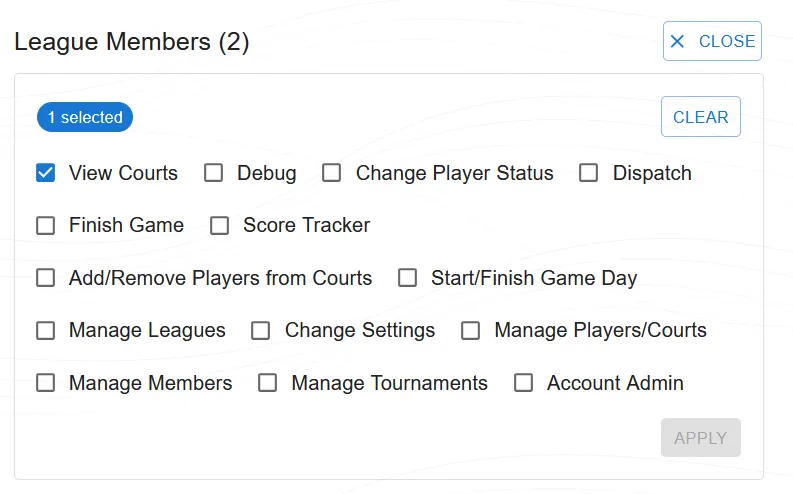
Roles combine different permissions. An 'Owner' has all permissions. An 'Admin' can do everything except delete the league or manage billing. A 'Manager' can run game days, create tournaments, and enter scores, but cannot change league settings. A 'Player' has read-only access to view their own stats and the live courts.
Granular Capabilities
ShowCourt
Show Court
View court assignments and current game status on the dashboard.
AddRemovePlayerCourt
Add/Remove Player from Court
Manually add or remove a player from a specific court before or during a game.
Dispatch
Dispatch
Run the dispatch algorithm to assign active players to available courts, and send tournament matches to courts from the banner or the tournament's match queue.
FinishGame
Finish Game
Enter scores and mark a game as finished on a court.
ScoreTracker
Score Tracker
Allow real-time score tracking for a game in progress.
ManageCourtPlayers
Manage Court Players
Move players on and off courts by hand: add a player to a court, take one off, or move one to another court.
ManagePlayerStats
Manage Player Stats
Override player statistics such as Elo rating, rank, total games played, wins, and win/loss streaks. Changes are logged in the event audit trail.
ChangePlayerStatus
Change Player Status
Change a player's status: put them on break, bring them back to the waiting list, or mark them as not available for the day. Also lets you rename players.
ChangeLeagueSettings
Change League Settings
Modify league configuration such as algorithm, courts, and game day settings.
StartGameDay
Start Game Day
Initialize a new game day session, resetting the dashboard for a fresh session.
ManageMembers
Manage Members
Add, remove, or edit member profiles and assign roles and permissions.
ManageLeagues
Manage Leagues
Create, delete, or reset leagues. This is a high-privilege action.
ManageTournaments
Manage Tournaments
Create, configure, start and finish tournaments (round robin, brackets, pool play), and withdraw a team that leaves a running tournament.
ManageSeasons
Manage Seasons
Start and end seasons. Required to create season tracking periods and compute end-of-season awards.
ManageReservations
Manage Reservations
Set up court reservations (courts, opening hours, limits, prices and payment), see who booked, cancel any booking and view reservation insights. Separate from Change Settings.
ManagePublicPage
Manage Public Page
Set up the league's public page: what visitors can see without signing in. Separate from Change Settings.
ManageApiAccess
Manage API Access
Turn the league's API access on or off and create or revoke API tokens (paid plans).
AccountAdmin
Account Admin
Create and delete leagues, manage the account subscription and billing plan, and connect the league's Stripe account for online booking payments. This is the highest privilege level.
Assigning Roles
Owners and Admins can promote other members from the 'Members' tab by adjusting their assigned Roles. Changes take effect on the user's next login or page refresh. Admins can't change their own permissions, except the Account Admin, who can (for example to give themselves Manage Reservations); they keep Account Admin and Manage Members so they can't lock themselves out.